Authenticate Operator Login using Open LDAP
Operator login can optionally be authenticated using Open LDAP.
|
➢
|
To configure operator login authentication using Open LDAP:
|
|
1.
|
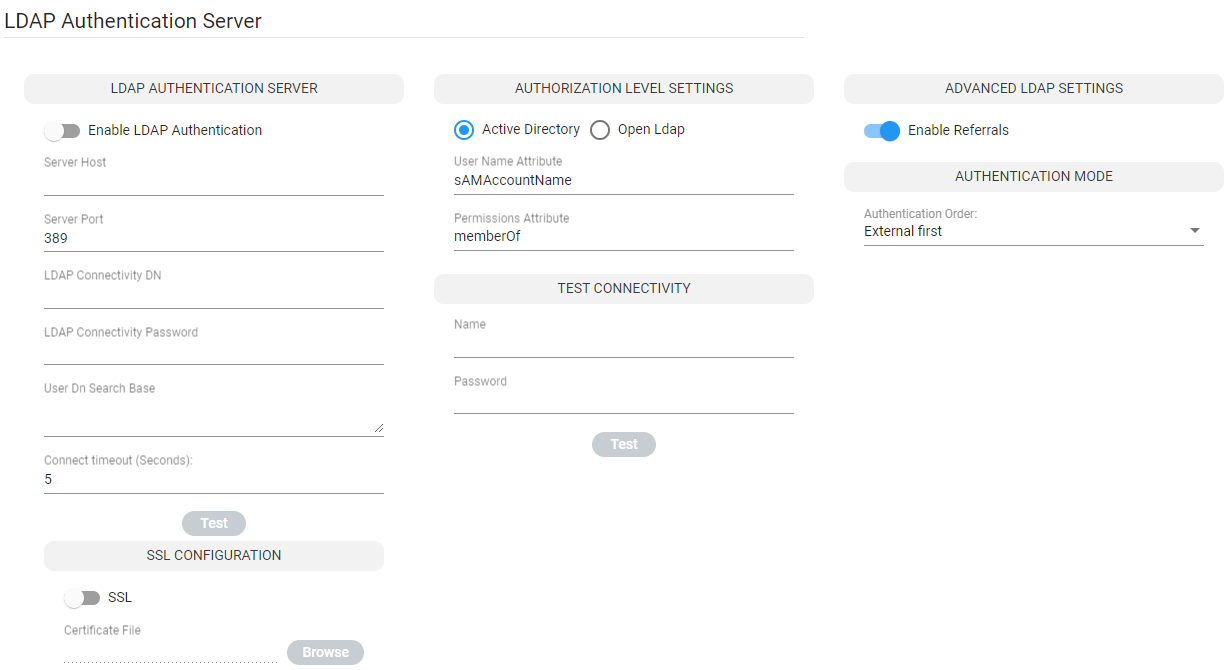
Open the LDAP Authentication page (Settings > Administration > LDAP Authentication) and then select Open LDAP under ‘Authorization Level Settings’.
|
Authenticating Operator Login using Open LDAP
|
2.
|
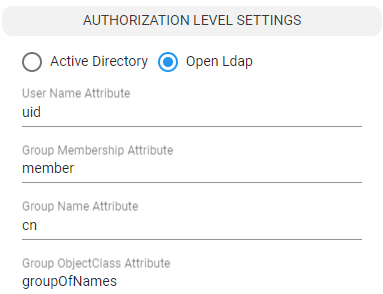
Configure the Authorization Level Settings. When Active Directory is selected (default), configure: |
|
a.
|
User Name Attribute [the LDAP attribute used to identify the username]
|
|
b.
|
Permissions Attribute [the LDAP attribute used to identify the user permissions]
|
|
a.
|
User Name Attribute [the LDAP attribute used to identify the username]
|
|
b.
|
Group Membership Attribute [The LDAP attribute used to list the members of the LDAP group]
|
|
c.
|
Group Name Attribute [The LDAP attribute used to identify the LDAP group name]
|
|
d.
|
Group ObjectClass Attribute [The value of the ObjectClass attribute that identifies a user group LDAP object]
|
See also Add an LDAP Server to ARM
See also Advanced LDAP Settings - Enable Referrals
See also Manage Authentication Order